- Apple Watch translation
- iPhone tips
- how-to
- AI Watch Translator
Translate From a Widget, the Action Button or Siri
By Kalyani Lokireddy
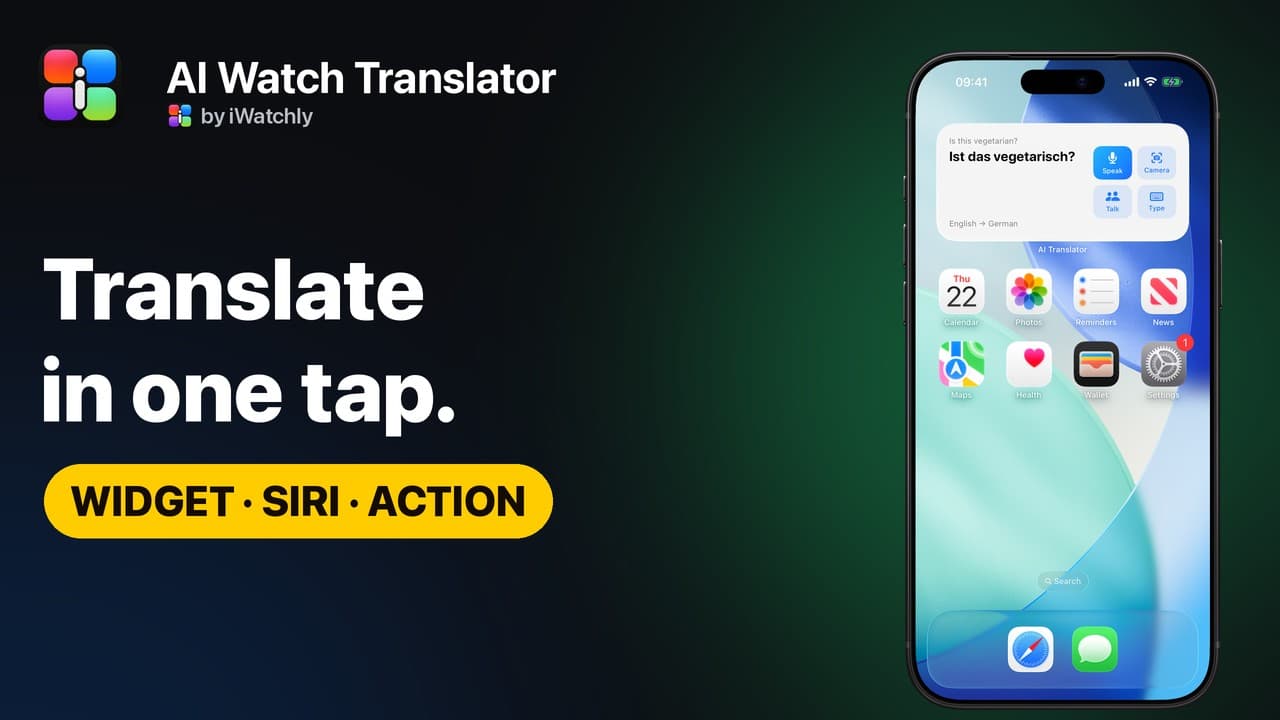
AI Watch Translator can start from almost anywhere: a Home Screen or Lock Screen widget, a button in Control Center, the Action button, Siri, or a complication on your watch face. Each one opens straight to the part you need.
Which buttons can you add?
Three: Translate opens on the microphone, Camera translate opens the camera, and Conversation opens the split-screen mode. Put any of them in Control Center, on the Lock Screen, or on the Action button of an iPhone that has one.
What does the widget show?
The Home Screen widget shows your last translation and your language pair. The medium size adds four buttons: Speak, Camera, Talk for Conversation, and Type. On the Lock Screen, the widgets give you a one-tap way in. Apple explains how to add widgets.
Can Siri translate without opening the app?
Yes. Say "Hey Siri, translate with AI Watch Translator". The app's old name, Translate Now, works too. Siri asks what you would like to translate, then speaks and shows the translation, without opening the app. It uses the language pair you last chose.
And on Apple Watch?
Add the complication to a watch face, or use it in the Smart Stack. One tap opens translation on the Watch with the microphone ready.
Q: Which iPhones have an Action button? A: Recent Pro models and newer iPhones do. Check Settings › Action Button.
Q: Does Siri count toward the free daily limit? A: Yes. Siri uses the iPhone's two free translations a day.
Q: Do the widgets show my translations to anyone? A: They show your last translation on your own screen, and it stays on the device.
Read next
Say It Differently: Other Ways to Phrase a Translation
Tap a word for alternatives, or rephrase the whole sentence as casual, formal, simpler or easier to say, each with its meaning.
1 min read
Live Camera Translation on iPhone: Point and Read
Live mode draws the translation right on the text as you move your iPhone. Freeze holds the view; Read lists everything in the frame.
1 min read
AI Watch Translator vs. the Built-in Translate App: What Differs
Apple's Translate is free and works offline. AI Watch Translator covers 29 languages, phrase books on the Watch and a Reply button, and needs a connection.
4 min read