- watchOS 27
- Apple Watch
- troubleshooting
- connectivity
Why Does My Apple Watch Keep Disconnecting From My Phone? 5 Causes
By Kalyani Lokireddy
Why does my Apple Watch keep disconnecting from my phone? Usually one of five things: the iPhone is at the edge of Bluetooth range, Low Power Mode is switching the watch's Wi-Fi off, Airplane Mode is copied from the iPhone, the watch is restarting by itself, or the two devices are on different updates. Notice when it drops, because that points to the cause. For a watch that has lost its iPhone once and stays lost, start with Apple Watch disconnected from iPhone: 5 fixes instead.
How do I check if it is really disconnected?
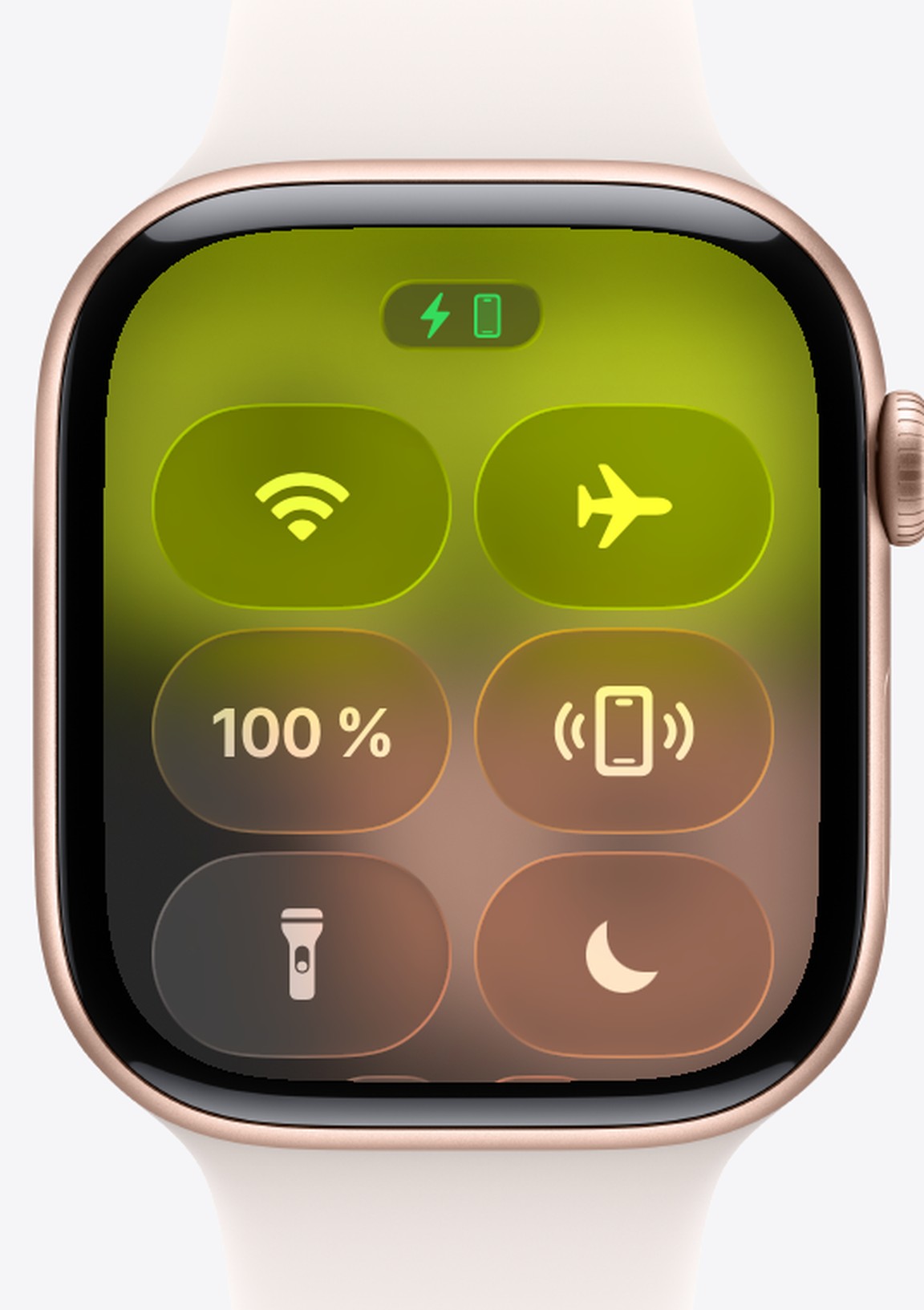
Press the side button to open Control Center. A green iPhone icon at the top means connected; a red iPhone or a red X means disconnected (Apple's connection guide). If the icon is green but alerts land on the iPhone, the connection is fine and a notification setting is the problem.
Does it drop when the iPhone is in another room?
That is range. Bluetooth reaches roughly 10 metres in open air and much less through walls. A watch on Wi-Fi can keep working without the phone nearby, but only on a network it has joined before.
Does it drop when the battery is low?
Then check Low Power Mode on the watch. Apple says that in Low Power Mode Wi-Fi and cellular are turned off whenever the iPhone is not nearby, until you open an app that needs a connection. So a watch that used to fall back to Wi-Fi now shows the red X instead.
Does it drop on flights or at bedtime?
Look at Airplane Mode. In the Watch app on the iPhone, General > Airplane Mode has a Mirror iPhone switch, so turning Airplane Mode on for the phone turns it on for the watch too. Swipe into Control Center on the watch and look for the orange plane.
Does the watch show the Apple logo, then drop?
It is restarting, and it shows as disconnected while it starts up. watchOS 27.0 had a bug that made watches restart unexpectedly, first reported on Series 12 and Ultra 4. Apple fixed it in watchOS 27.0.1 and then released it for older models. Update the watch in Settings > General > Software Update.
Did it start after an update?
Update the iPhone too, so both run the current iOS 27 and watchOS 27 releases. Then follow Apple's order: Airplane Mode off and Bluetooth on, restart both devices, and only then unpair and pair again.
What still works between drops?
Anything saved on the watch. Videos saved with iWatch Videos and PDFs opened with iWatch PDF still open while the watch is disconnected. Anything streamed waits for the connection.
Q: Why does my Apple Watch keep disconnecting from my iPhone?
A: Usually range, Low Power Mode turning off Wi-Fi, Airplane Mode mirrored from the iPhone, the watch restarting by itself, or an update on only one device.
Q: Does Low Power Mode disconnect Apple Watch?
A: It does not end the Bluetooth link, but it turns Wi-Fi and cellular off when the iPhone is not nearby, so the watch cannot fall back to Wi-Fi.
Q: Should I unpair my Apple Watch to stop it disconnecting?
A: Only after checking Airplane Mode and Bluetooth, updating both devices and restarting both. Unpairing is Apple's last step.
Read next
Apple Watch Disconnected From iPhone? 5 Fixes, in Order
A red iPhone or a red X means your Apple Watch has lost its iPhone. Five fixes, in the order Apple recommends.
5 min read
Restart, Force Restart or Unpair: Which Apple Watch Reset to Use
Three resets, three different jobs. Use the gentlest one that fixes your problem and keep your data.
3 min read
watchOS 27: What Changed on Your Apple Watch, and What to Try First
Siri that holds a conversation, a one-finger gesture for the Smart Stack, a new app grid and quieter health alerts. What is worth your time on day one.
4 min read